Apply a tax on another tax
Some taxes are calculated on another tax, for example a surcharge on a tax amount or a levy on the subtotal after tax. In a taxes template, you set this up with one of two row types:
| Type | Base | Use when the rule says |
|---|---|---|
| On Previous Row Amount | The Amount of the referenced row | The second tax applies to the earlier tax amount only |
| On Previous Row Total | The running Total after the referenced row | The second tax applies to the subtotal that includes the earlier tax |
With a Net Total of 1,000, row 1 at 8% On Net Total, and row 2 at 2% with Reference Row # 1:
| Row 2 type | Row 2 base | Row 2 amount | Grand Total |
|---|---|---|---|
| On Previous Row Amount | 80.00 | 1.60 | 1,081.60 |
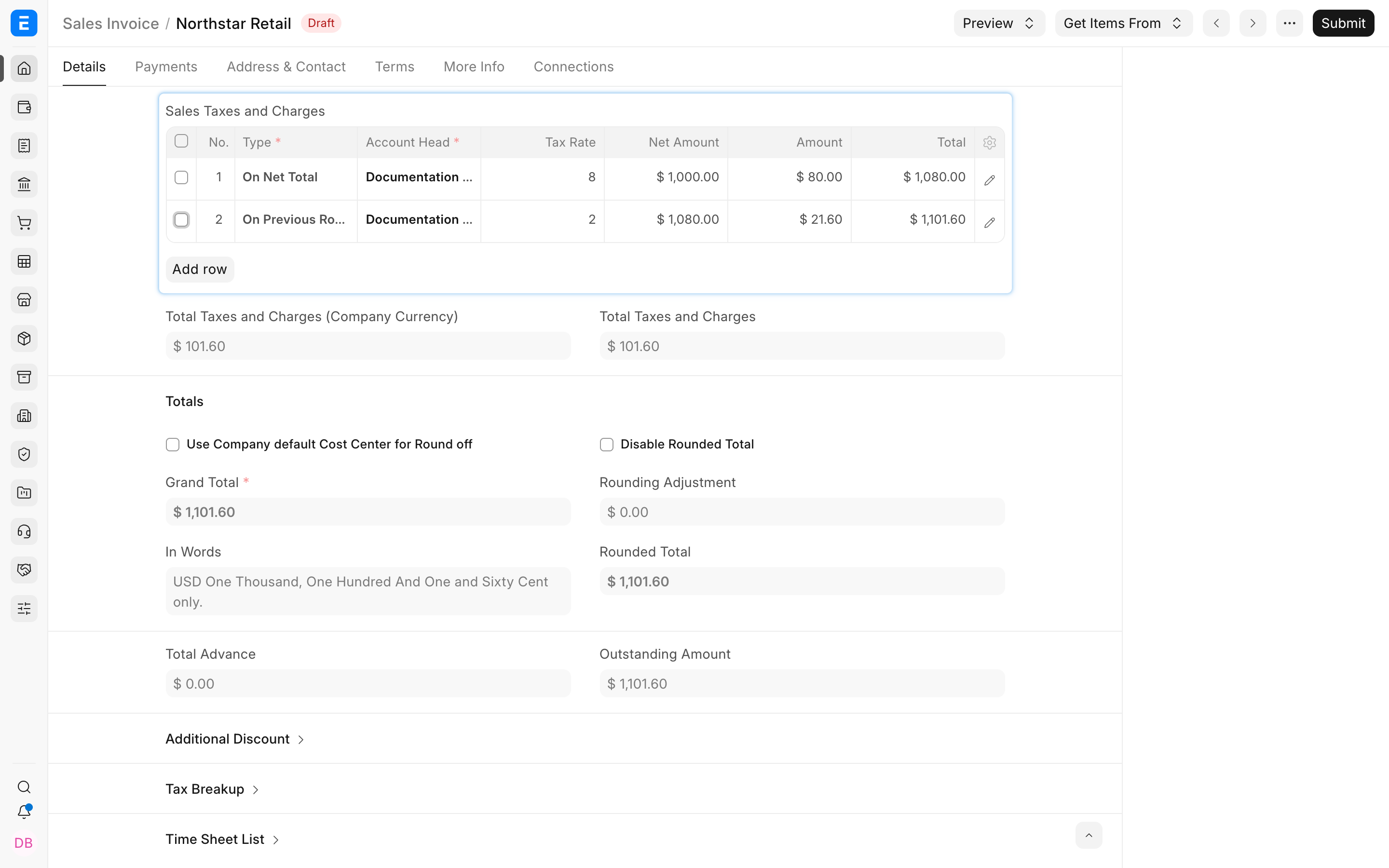
| On Previous Row Total | 1,080.00 | 21.60 | 1,101.60 |
Prerequisites
- The calculation order that your tax rules require. Confirm it with your tax adviser.
- An account for each tax. Separate accounts make each liability easier to check.
- A Sales Taxes and Charges Template or Purchase Taxes and Charges Template, or a draft document where you can edit the tax rows.
Set up the rows
- Add the base tax as an earlier row, for example Type On Net Total, the tax account, and Tax Rate 8.
- Below it, add the dependent row:
- Set Type to On Previous Row Amount or On Previous Row Total.
- In Reference Row #, enter the number of the base row, for example 1.
- Select the Account Head of the second tax.
- Enter the Tax Rate, for example 2.
- Save.
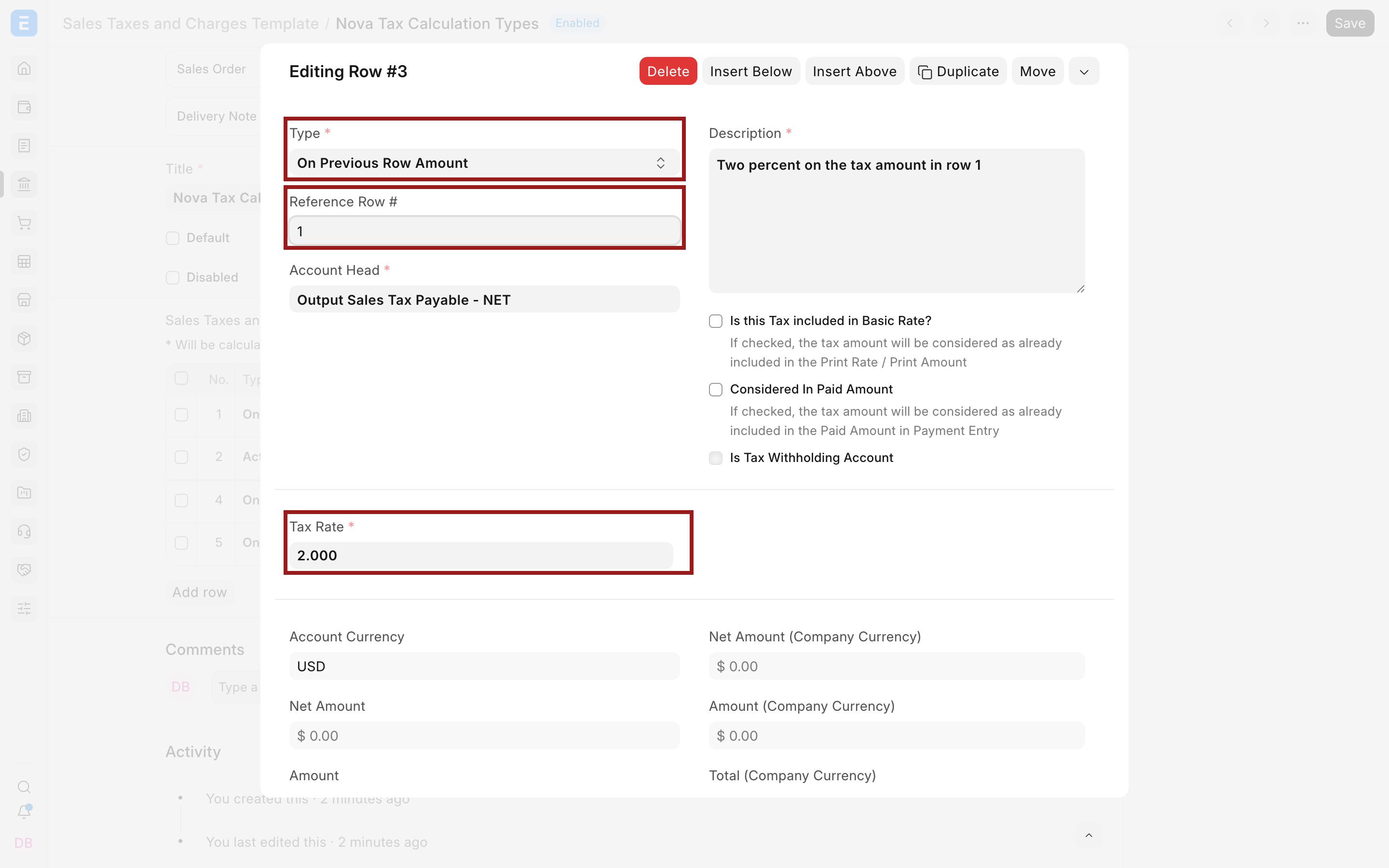
Reference Row # stores a row number. When you insert, delete, or move rows, check every reference again.
Check the calculation
- Create a draft document, for example a Sales Invoice, with one item worth 1,000, and select the template.
- In the tax table, check row 2:
- Net Amount shows the base: 80 for On Previous Row Amount, 1,080 for On Previous Row Total.
- Amount shows 1.60 or 21.60.
- Check Total Taxes and Charges and Grand Total.
- Submit a test document and check each tax account in the General Ledger.
Longer sequences
A row can reference any earlier row. For example: row 1 is a tax on Net Total, row 2 a fixed charge, and row 3 a percentage On Previous Row Total. If row 3 references row 2, its base includes the items, row 1, and row 2. If it references row 1, the base excludes row 2.
Each row has one reference. On Previous Row Amount uses the amount of one row only. To tax several rows together, reference the row whose running Total contains them.
Write the base in the row Description, for example "2% on total after base tax", so that others can check the template.
Item-specific rates, purchases, and returns
- When items use Item Tax Templates, the base row's Amount is the sum after the item rates. The dependent row uses that amount.
- On purchase rows, also choose Consider Tax or Charge for for each row. See Include tax in valuation or total.
- A Credit Note copies the rows and reverses both taxes. Test one before you rely on the template.
Troubleshooting
| Problem | Cause and fix |
|---|---|
| The second tax is much larger than expected | The row uses On Previous Row Total. Use On Previous Row Amount if the base is the earlier tax only. |
| The second tax is too small | The row uses On Previous Row Amount. Use On Previous Row Total if the base is the running total. |
| The base includes an unwanted charge | Reference Row # points to a later row than intended. |
| The result changed after editing the template | Row numbers changed. Check Reference Row # on every dependent row. |
| "Cannot refer row number greater than or equal to current row number for this Charge type" | Point the reference to an earlier row. |