Choose the right accounting report
ERPNext accounting reports show the same submitted ledger entries from different angles. No single report answers every question. Start with the decision you need to make, pick the report that answers it, and then move from a summary number down to the document that created it.
Which report answers which question
| Question | Report |
|---|---|
| Which entries make up this account balance? | General Ledger |
| Do total debits equal total credits, and what is each account's opening, movement, and closing balance? | Trial Balance |
| What does the company own and owe on a date? | Balance Sheet |
| Did the company make a profit in a period? | Profit and Loss Statement |
| Why did cash go down when the company made a profit? | Cash Flow |
| Which customer invoices need follow-up? Which supplier invoices are due? | Accounts Receivable and Accounts Payable |
| Why is an invoice still outstanding after a payment? | Payment Ledger |
| How much of a Sales Order's payment schedule is invoiced? | Payment Terms Status for Sales Order |
| How much deferred revenue or expense is recognized in each period? | Deferred Revenue and Expense |
| How do actual expenses compare with the budget? | Budget Variance Report |
Other reports cover specific needs: Sales Register and Purchase Register list invoices with their tax columns, Delivered Items To Be Billed and Received Items To Be Billed find unbilled deliveries and receipts, and Consolidated Financial Statement combines several companies.
How the reports relate
A typical month-end review moves from broad to detailed:
- Trial Balance confirms that debits and credits agree. Agreement proves arithmetic balance only. It does not prove that each transaction used the right account.
- The Balance Sheet and Profit and Loss Statement show position and performance.
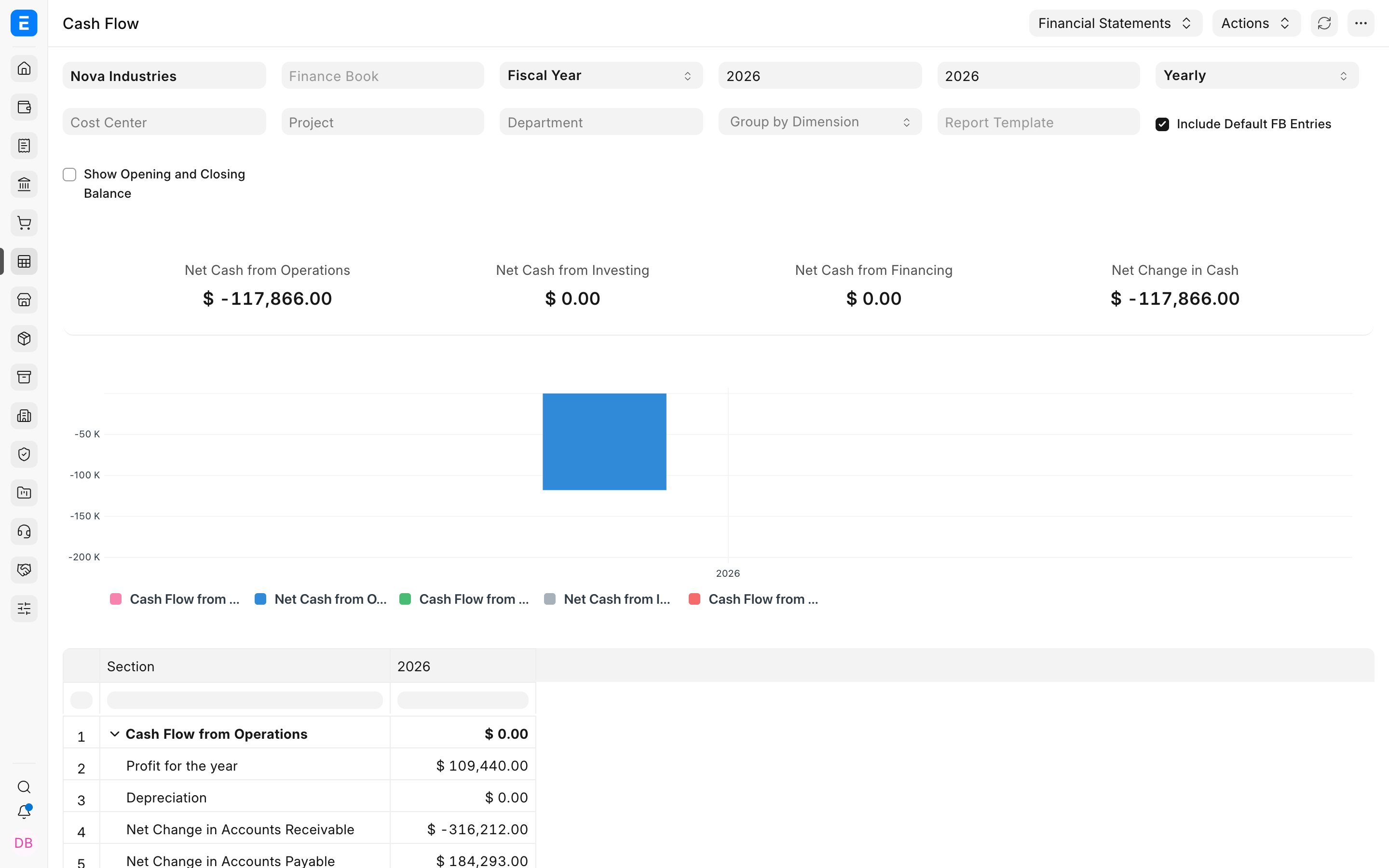
- Cash Flow explains why cash moved differently from profit. For example, Nova Industries shows a profit of 109,440 for the year but a negative operating cash flow of 117,866, because 316,212 of sales are still unpaid in Accounts Receivable.
- Accounts Receivable and Accounts Payable turn that finding into action: which customers to chase and which suppliers to pay.
- The General Ledger gives the evidence behind any number, with a link to each source voucher.
| Statement | Covers | Does not explain |
|---|---|---|
| Trial Balance | Opening, period, and closing balance of each account | What each transaction was for |
| Balance Sheet | Assets, liabilities, and equity on a date | How profit was earned |
| Profit and Loss Statement | Income and expenses for a period | Whether the income was collected |
| Cash Flow | Cash from operating, investing, and financing activities | Which invoices are unpaid |
Filters change the result, not the ledger
Report filters select and present entries. They never change submitted ledger entries. When two reports seem to disagree, run both with the same values for these filters before you look further:
| Filter | Why it matters |
|---|---|
| Company | Limits the report to one company. Use Consolidated Financial Statement for a group view. |
| Dates or fiscal years | Change which activity and balances are included. A report for a period and a report as of a date answer different questions. |
| Finance Book | Limits the report to entries of the selected finance book. Include Default FB Entries adds entries of the company's default finance book and entries without one. |
| Cost Center, Project, and other accounting dimensions | Show one segment of the business. Entries without the dimension value are left out. |
| Currency | Changes the presentation currency only. |
Troubleshooting
Trial Balance and General Ledger look different
Use the same company, dates, finance book, and dimensions in both. Trial Balance splits each account into opening, period, and closing values, while the General Ledger lists each posting. A previous fiscal year that is not closed with a Period Closing Voucher also changes how income and expense balances appear.
A financial statement is empty
Check that submitted documents exist for the selected company and period. Remove the finance book and dimension filters one at a time. Then check that the accounts have the right Root Type and Report Type in the Chart of Accounts.
The total is right but the account is wrong
A balanced total cannot catch a wrong account. Open the amount in the General Ledger, open the source voucher, and correct it by cancelling and amending it or with a Journal Entry.
A report keeps loading
Shorten the period or narrow the filters. ERPNext can run a slow report as a prepared report in the background. Wait for the prepared report to finish before you read or export it.
Related
- Financial Report Template: build your own layout for the Balance Sheet, Profit and Loss Statement, or Cash Flow
- Accounting dimensions
- Finance Book