Run the Cash Flow report
The Cash Flow report explains how cash changed in a period. It starts from the profit for the period and adjusts it for non-cash items and changes in receivables, payables, and inventory. Use the Profit and Loss Statement to measure profit and the Balance Sheet to see the financial position.
Run the report
- Open the Cash Flow report.
- Select the Company.
- In Filter Based On, select Fiscal Year and set Start Year and End Year, or select Date Range and set Start Date and End Date.
- Select the Periodicity.
- Optional: select a Finance Book, Cost Center, Project, or another accounting dimension.
- Optional: select Show Opening and Closing Balance to add the opening and closing cash balances, so you can reconcile the report with your bank and cash accounts.
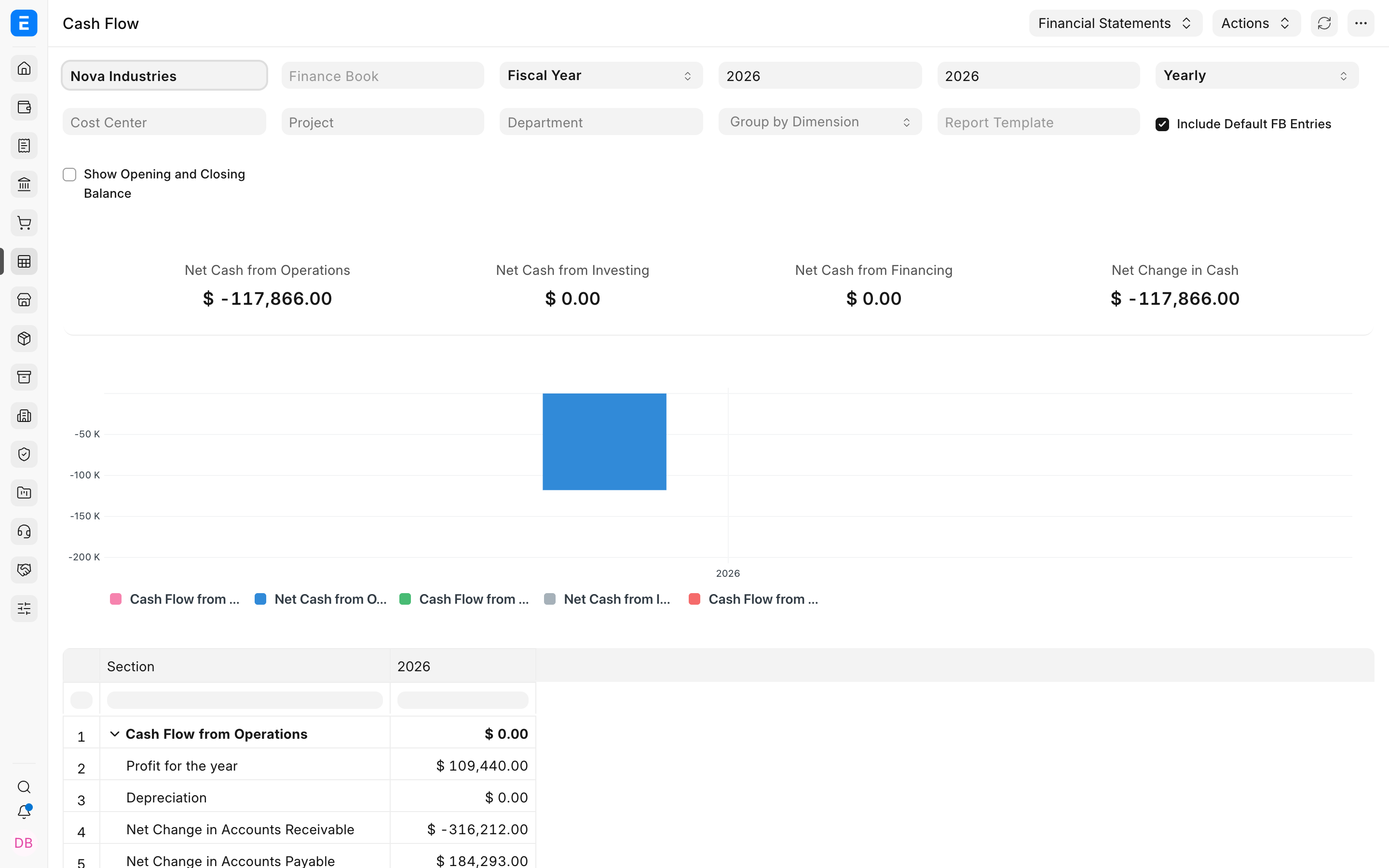
How the standard report groups accounts
Without a template, ERPNext builds three sections from the Account Type of each account:
| Section | Lines |
|---|---|
| Cash Flow from Operations | Profit for the year, then Depreciation, Net Change in Accounts Receivable, Net Change in Accounts Payable, and Net Change in Inventory (accounts of type Depreciation, Receivable, Payable, and Stock) |
| Cash Flow from Investing | Net Change in Fixed Asset (accounts of type Fixed Asset) |
| Cash Flow from Financing | Net Change in Equity (accounts of type Equity) |
Each section ends with a total (Net Cash from Operations, Net Cash from Investing, Net Cash from Financing), and the report ends with Net Change in Cash. An account without one of these account types is not in the report. To use other lines or groupings, see Customize the Cash Flow report.
Read the result
| Line | Nova Industries | Meaning |
|---|---|---|
| Profit for the year | 109,440 | Profit before cash adjustments. |
| Net Change in Accounts Receivable | -316,212 | Sales recognized but not yet collected. |
| Net Change in Accounts Payable | 184,293 | Supplier bills not yet paid, which keeps cash in the business for now. |
| Net Cash from Operations | -117,866 | Operations used cash despite the profit. |
In this example, uncollected receivables are the main cause. Review Accounts Receivable to plan collections. Unpaid supplier bills help cash only until they fall due, so check Accounts Payable too.
Trace a line
Select a line amount to open the General Ledger for the accounts behind it. Working-capital lines are changes between two dates, so also compare the related Balance Sheet accounts.
Filters and options
| Filter | Effect |
|---|---|
| Report Template | Uses a Financial Report Template of type Cash Flow for the layout. |
| Account Detail Level | With a template: Summary shows the template lines; Account Breakdown also lists the accounts under each line. |
| Include Default FB Entries | Includes entries of the company's default finance book and entries without one. Selected by default. |
| Show Opening and Closing Balance | Adds opening and closing cash balance rows. |
Troubleshooting
Profit and operating cash flow are very different
This is often expected. Review the changes in receivables, payables, inventory, and depreciation, and explain the difference instead of forcing a match.
A cash movement is in the wrong section
The standard report uses the account type. Check the Account Type of the account in the Chart of Accounts, or use a template that places the account where you need it.
Net change in cash does not match the bank and cash balances
Use the same company, dates, finance book, and dimensions as the balance you compare with. Then look for accounts without a cash flow account type, which the standard report leaves out.