Write off a bad debt
A bad debt is an amount that a customer owes and that you no longer expect to collect. To write it off, create a Journal Entry that debits an expense account and credits the receivable account. Link the receivable row to the customer and to the Sales Invoice, so that the write-off closes or reduces that invoice.
The example on this page writes off USD 500 from the customer Northstar Retail.
Prerequisites
- Your collection and approval process is complete. Review the customer's Accounts Receivable, credit notes, unallocated payments, disputes, and dunning history.
- You know the approved amount, the posting date, the customer, and the Sales Invoice.
- An expense account for bad debts exists, for example Bad Debt Expense. It must be a ledger (non-group) account. Ask your accountant which account to use.
- You have the approval evidence to attach.
TIP
If the amount goes down because of a return, a price dispute, or a commercial concession, create a credit note instead. A credit note corrects income and tax. A bad-debt Journal Entry records a loss on collection.
The accounting entry
| Account | Debit | Credit | Result |
|---|---|---|---|
| Bad Debt Expense | 500 | Records the loss in the Profit and Loss statement | |
| Receivable account, for example Debtors | 500 | Reduces what the customer owes |
Create the Journal Entry
- Open the Journal Entry list and select Add Journal Entry.
- Select the Company and the Posting Date. Keep Entry Type as Journal Entry, unless your policy uses Write Off Entry.
- In the Accounting Entries table, add a row for the bad-debt expense account. Enter the amount in Debit.
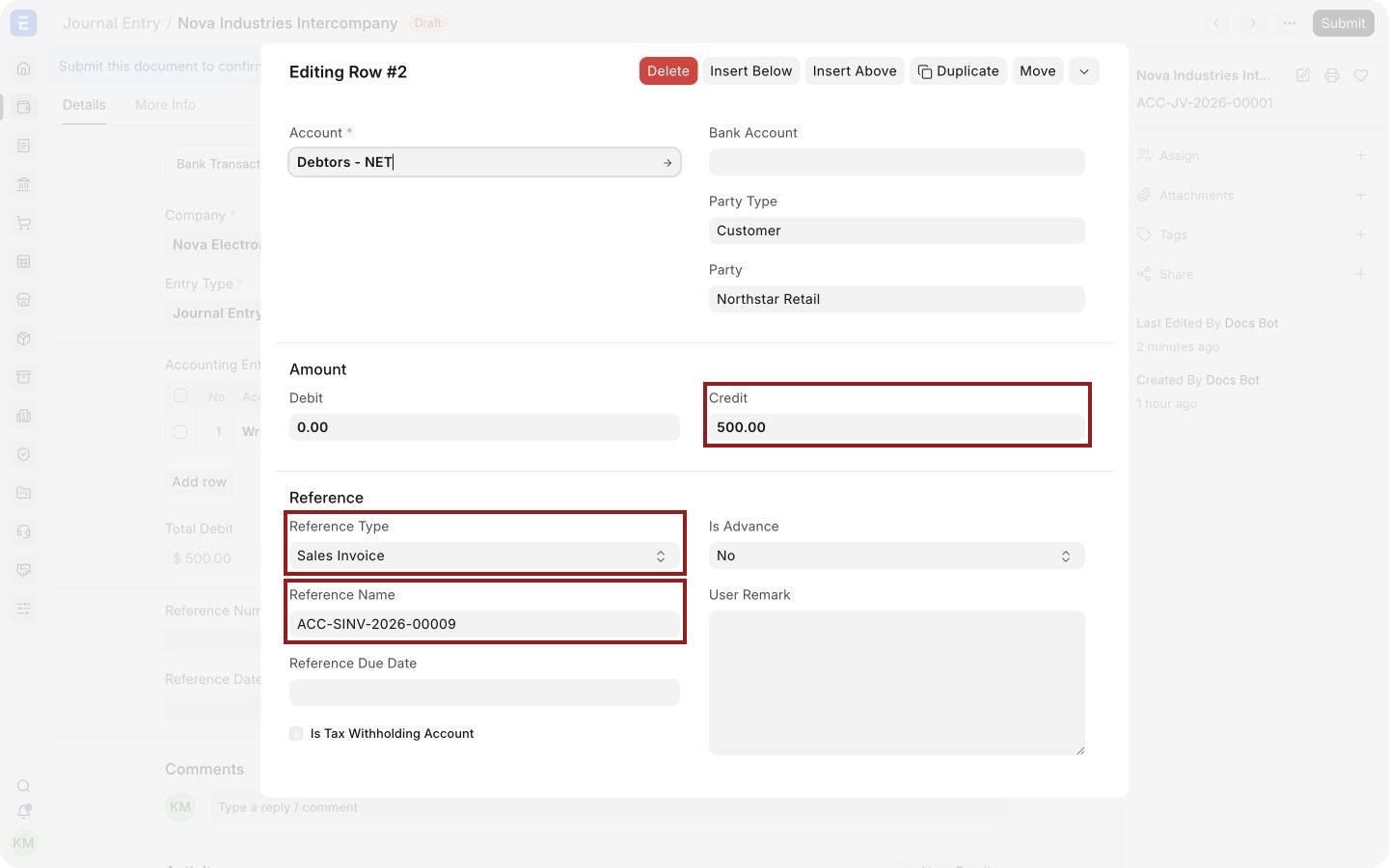
- Add a second row for the receivable account that the Sales Invoice used (its Debit To account). Enter the same amount in Credit.
- On the receivable row, select the edit icon at the end of the row to open all its fields.
- Set Party Type to Customer, and select the customer in Party.
- Set Reference Type to Sales Invoice, and select the invoice in Reference Name.
- Close the row. Check that Total Debit equals Total Credit.
- In User Remark, describe the write-off, for example
Approved bad debt write-off for ACC-SINV-2026-00009. - Attach the approval and the collection history.
- Save, check the accounts, party, reference, and date, and then submit.
WARNING
The invoice reference is essential. Without it, the Journal Entry balances the General Ledger, but the Sales Invoice stays outstanding in the Accounts Receivable report.
The Journal Entry posts only General Ledger entries. It does not move stock, and it does not change the items, income, or tax of the original Sales Invoice.
Write off part of an invoice
Enter only the approved amount in both rows. The rest of the invoice stays outstanding. For example, if USD 1,200 is outstanding and you write off USD 500, USD 700 stays outstanding.
To write off several invoices in one Journal Entry, add one receivable row for each invoice, each with its own reference.
If the customer pays later
Do not cancel or edit the submitted write-off. Record the recovery as a new entry, on the account that your accounting policy sets for recoveries. Refer to the customer, the original invoice, and the write-off Journal Entry. Ask your accountant when the recovery affects tax or a closed period.
Check the result
In the General Ledger and the Accounts Receivable report, for the same company, date, and currency, check that:
- the outstanding amount of the Sales Invoice went down by the write-off;
- the expense account is debited, and the receivable account is credited;
- the receivable entry has the customer and the Sales Invoice reference.
Troubleshooting
The Sales Invoice is still fully outstanding
Open the receivable row, and check Party Type, Party, Reference Type, and Reference Name. Check that the amount is in Credit on the receivable row, not on the expense row.
You cannot select the customer or the invoice
Check that the receivable account, the customer, the Sales Invoice, and the Journal Entry belong to the same company. Check the invoice currency and the account currency.
Total Debit and Total Credit do not match
Enter the same amount as a debit on the expense row and a credit on the receivable row. For a foreign-currency invoice, add any exchange difference that your policy requires.