Create a debit note for a price adjustment
Use this method when a supplier lowers the price after you submitted the Purchase Invoice, and you keep the goods. The debit note reduces the payable and the expense or asset value, and does not move stock.
Example: the supplier billed 10 phones at $520 each. You agree that the right price is $500. No phones go back, but you now owe the supplier $200 less.
Prerequisites
- The original Purchase Invoice is submitted.
- The supplier confirmed the new price, and you know the reduction per unit. In the example: $520 - $500 = $20 for each of 10 phones, a total of $200.
- You have the supplier's credit note, revised invoice, or other approval that explains the reduction and the tax treatment.
Create the debit note
- Open the submitted Purchase Invoice.
- Select Create, and then select Return / Debit Note.
- Check that Is Return (Debit Note) is selected and that Return Against Purchase Invoice is the original invoice.
- Remove the rows that the price change does not affect.
- Open the affected row with the edit icon at the end of the row.
- In Accepted Qty, enter the number of units that get the reduction, as a negative number. In the example,
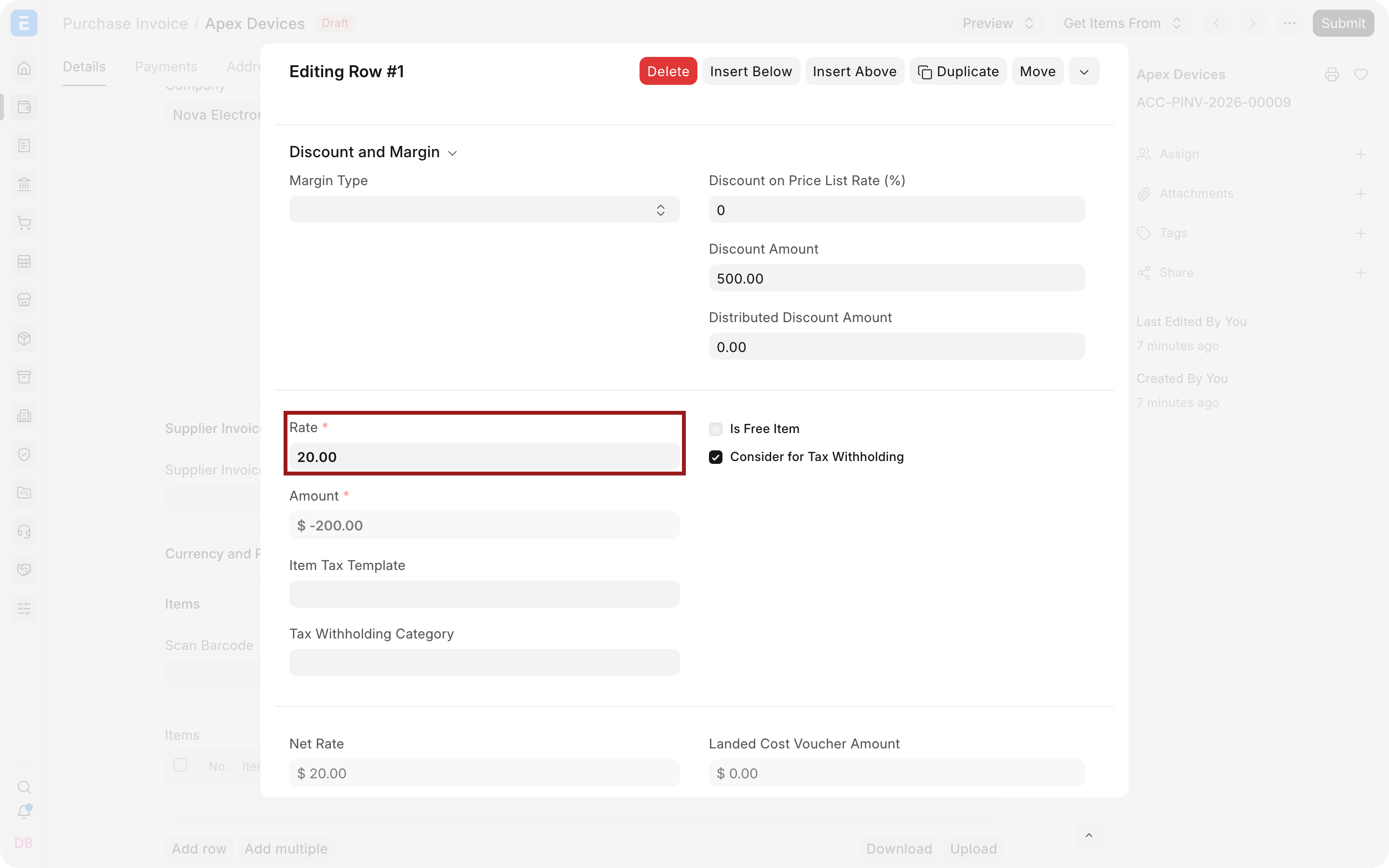
-10. - In Rate, enter the reduction per unit, not the new price. In the example,
20. The amount is -$200. - Leave Update Stock clear, because no goods go back.
- Check the taxes. Change them only when the supplier's credit document and your tax rules require it.
- Save and submit.
Why you enter the quantity and the price difference
ERPNext calculates the amount as quantity multiplied by rate: 10 units × $20 = $200. On a debit note the quantity is negative, so the payable goes down by $200. With Update Stock clear, the negative quantity does not mean that ten units left the warehouse.
Do not enter the new price ($500) as the rate. That reduces the bill by $5,000 instead of $200.
If only some units get the reduction, enter only those units. For example, if four of ten units get $20 off, enter -4 and 20.
WARNING
The units on the price-adjustment debit note count as returned against the original invoice. If you later return some of the same goods physically, ERPNext can block the return because the returnable quantity is used up.
Fields to check
| Field | What to enter |
|---|---|
| Is Return (Debit Note) | Selected. |
| Return Against Purchase Invoice | The original invoice. |
| Accepted Qty | The negative number of units that get the reduction. |
| Rate | The reduction per unit. |
| Amount | The total reduction. Compare it with the supplier's credit document. |
| Update Stock | Clear. |
| Update Outstanding for Self | Selected by default: the debit note keeps its own outstanding amount. Clear it to reduce the outstanding amount of the original invoice directly. |
| Posting Date | The date on which the adjustment affects the accounts. |
| Purchase Taxes and Charges | Reverses the tax for the reduction, when the reduction includes tax. |
Check the result
- The debit note total equals the credit agreed with the supplier.
- The outstanding amount of the original invoice, or of the debit note, is right.
- The stock quantity of the item did not change.
- The supplier balance in the Accounts Payable report shows the reduction.
If you have already paid the original invoice, the debit note is a credit from the supplier. Allocate it to a later invoice with Payment Reconciliation, or record the supplier's refund with a Payment Entry.
Troubleshooting
The debit note amount is too large
You entered the new price instead of the difference. Enter the original price minus the new price in Rate.
The stock quantity changed
The debit note was submitted with Update Stock selected. If the period allows it, cancel the debit note, amend it with Update Stock clear, and submit it again.
The original invoice still shows the old outstanding amount
Update Outstanding for Self was selected, so the reduction is on the debit note. Allocate the debit note to the invoice with Payment Reconciliation. Also check Return Against Purchase Invoice and the existing payments.
Frequently asked questions
Is this the same as a return of goods?
No. A price adjustment changes the payable and keeps the stock. A return also takes the goods out of stock. Learn how to create a debit note for a return.
Can I cancel and amend the original invoice instead?
Only if your permissions, the posting period, your audit policy, and the linked documents allow it. A debit note keeps a clearer audit trail after you have accepted the bill.