Customize the Cash Flow report
The standard Cash Flow report groups accounts by account type into fixed lines. When you need other headings, more detailed lines, or your own subtotals, for example an IFRS-style statement with finance costs and taxes paid on separate lines, use a Financial Report Template with Report Type set to Cash Flow. The template changes the layout only. It does not change any ledger entry.
Prerequisites
- You ran the standard Cash Flow report for a period with operating, investing, and financing activity, and noted its totals as a baseline.
- An accountant approved the headings, account groupings, signs, and formulas you need.
- If template rows filter by Account Category, each account in the Chart of Accounts has the right Account Category.
Create the template
- Open the Financial Report Template list.
- Open Standard Cash Flow Statement (IFRS) and duplicate it, or create a new template. A copy keeps the standard template as a baseline.
- Enter a Template Name and set Report Type to Cash Flow.
- In Report Line Items, add or change rows in the order they appear in the report. For each row, set the Data Source:
- Blank Line with a Display Name for a section heading, or without one for spacing.
- Account Data for amounts from accounts. Set the Balance Type, usually Period Movement (Debits - Credits), and the account filter.
- Calculated Amount for subtotals that add up earlier rows by their Line Reference.
- Indent supporting lines with Indent Level and select Reverse Sign where a movement must show with the opposite sign, such as an increase in receivables.
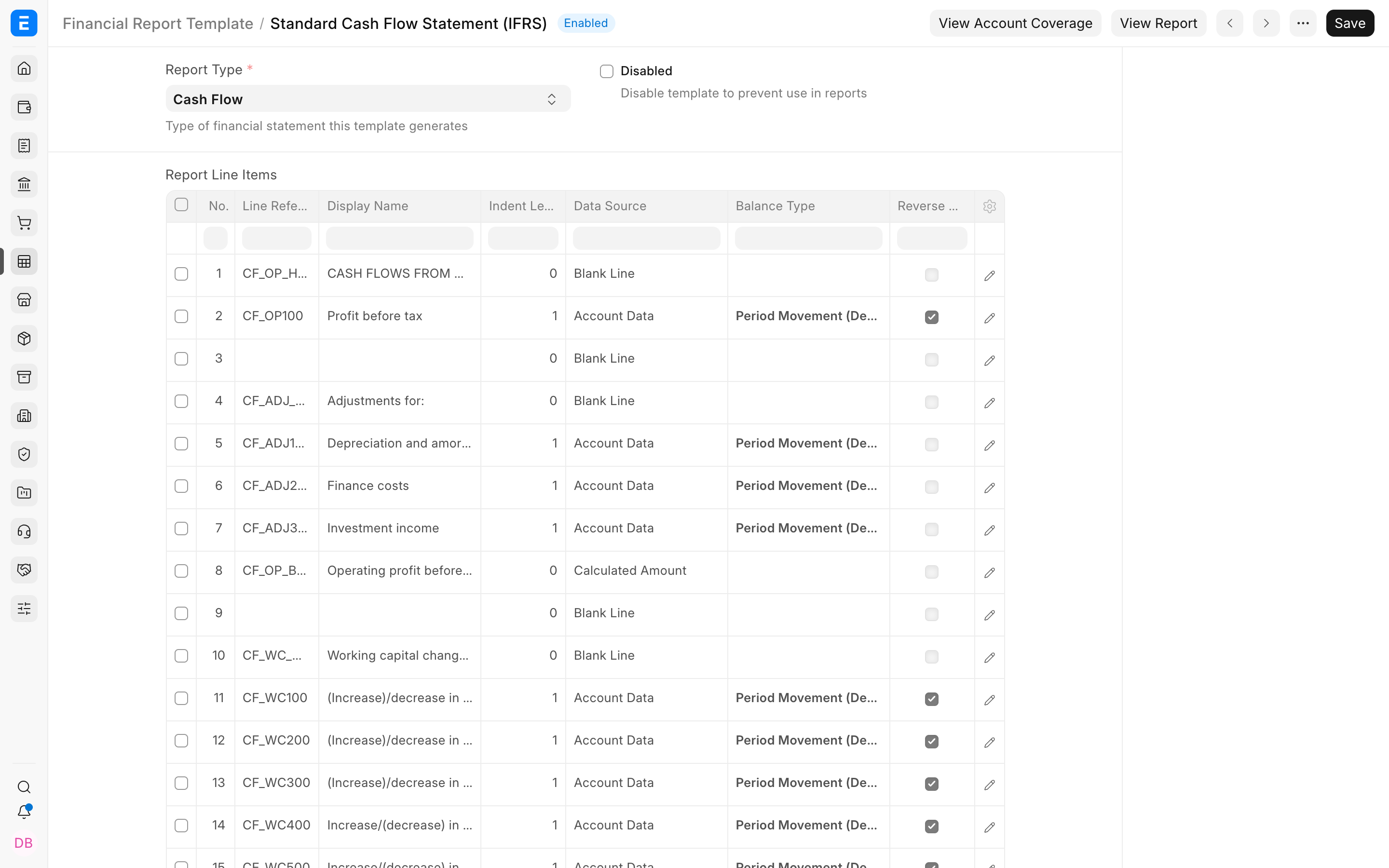
Example lines from the standard IFRS template:
| Line | Data Source | Setting |
|---|---|---|
| CASH FLOWS FROM OPERATING ACTIVITIES | Blank Line | Heading at indent level 0 |
| Profit before tax | Account Data | Income and expense accounts, except the tax expense category |
| Depreciation and amortization | Account Data | Accounts of type Depreciation |
| Operating profit before working capital changes | Calculated Amount | CF_OP100 + CF_ADJ100 + CF_ADJ200 + CF_ADJ300 |
| (Increase)/decrease in trade receivables | Account Data | Category Trade Receivables, with Reverse Sign |
| Cash and cash equivalents at end of period | Account Data | Category Cash and Cash Equivalents, Balance Type set to Closing Balance |
The standard template also has a Validation Check (should be zero) line. It subtracts the opening cash, the net change, and the exchange effect from the closing cash. A non-zero value shows that some cash movement is not covered by the template.
Check the custom report
- Select View Account Coverage in the template to see which accounts no Account Data row includes.
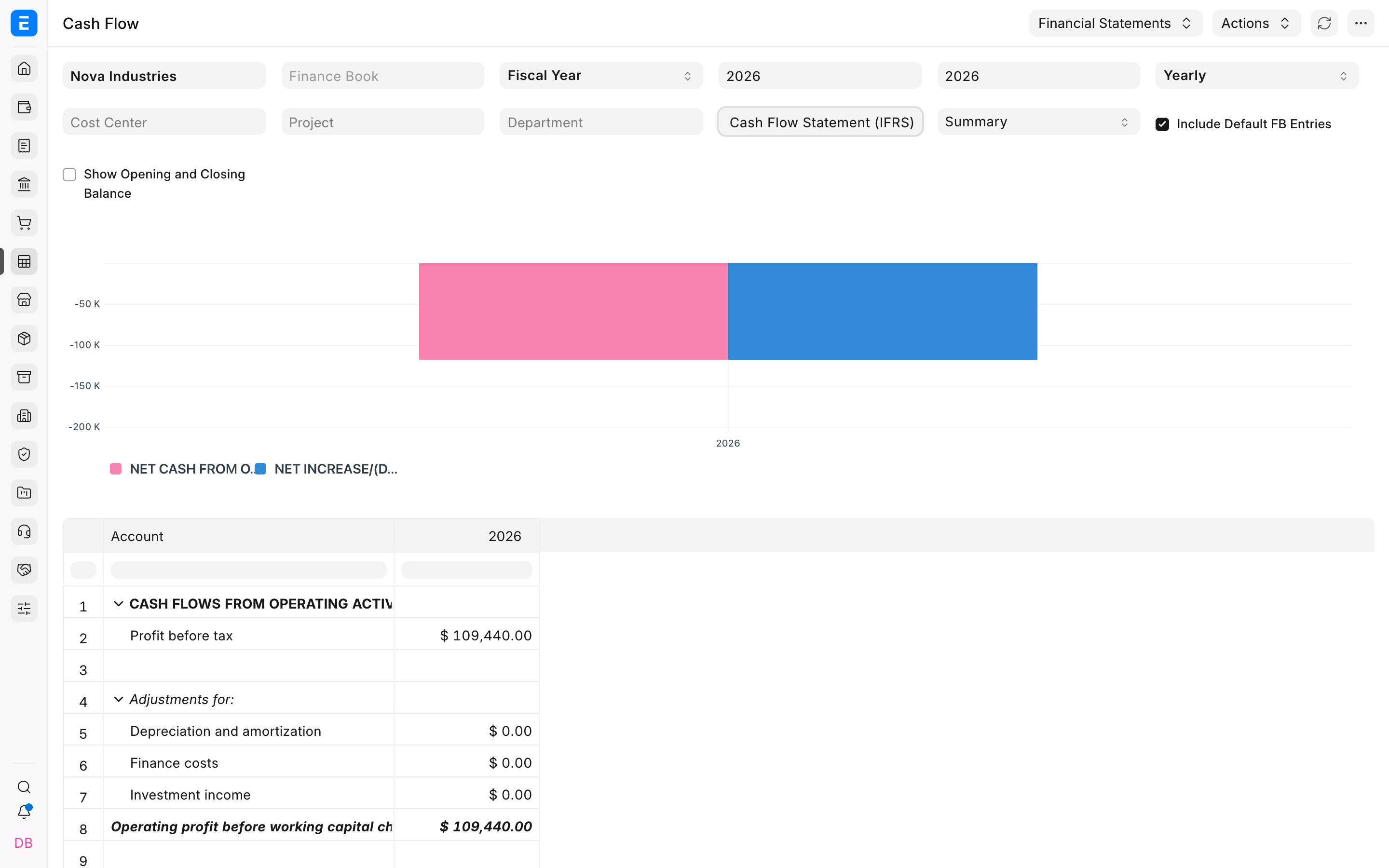
- Run Cash Flow for the baseline company and period, with your template selected in Report Template.
- Check that each line is under the right section.
- Compare the section totals and closing cash with the standard report and the General Ledger.
- Repeat for a second period before you use the template for management or external reporting.
Troubleshooting
A line is missing
Check that the account filter matches the accounts you expect and that the period has activity in them. If Hide If Zero is selected, a zero line does not show.
An amount appears twice
Two Account Data rows include the same account, or a row includes both a parent account and its children. Use View Account Coverage with the rows selected to see which accounts each row includes.
Net cash does not reconcile
Run the template and the standard report with the same company, dates, finance book, and dimensions. Then check for missing or duplicated accounts, wrong Line Reference codes in formulas, and missing Reverse Sign.