Run the Balance Sheet
The Balance Sheet shows what the company owns (assets), what it owes (liabilities), and the owners' share (equity) at the end of each period. To see how profit was earned, use the Profit and Loss Statement. To see why cash moved, use Cash Flow.
Prerequisites
- Invoices, payments, stock transactions, depreciation, and Journal Entries for the period are submitted.
- Each account has the right Root Type (Asset, Liability, or Equity) in the Chart of Accounts.
Run the report
- Open the Balance Sheet report.
- Select the Company.
- In Filter Based On, select Fiscal Year and set Start Year and End Year, or select Date Range and set Start Date and End Date.
- Select the Periodicity: Monthly, Quarterly, Half-Yearly, or Yearly. ERPNext shows one column for each period.
- Optional: select a Finance Book, Cost Center, Project, or another accounting dimension to see one segment.
Read the result
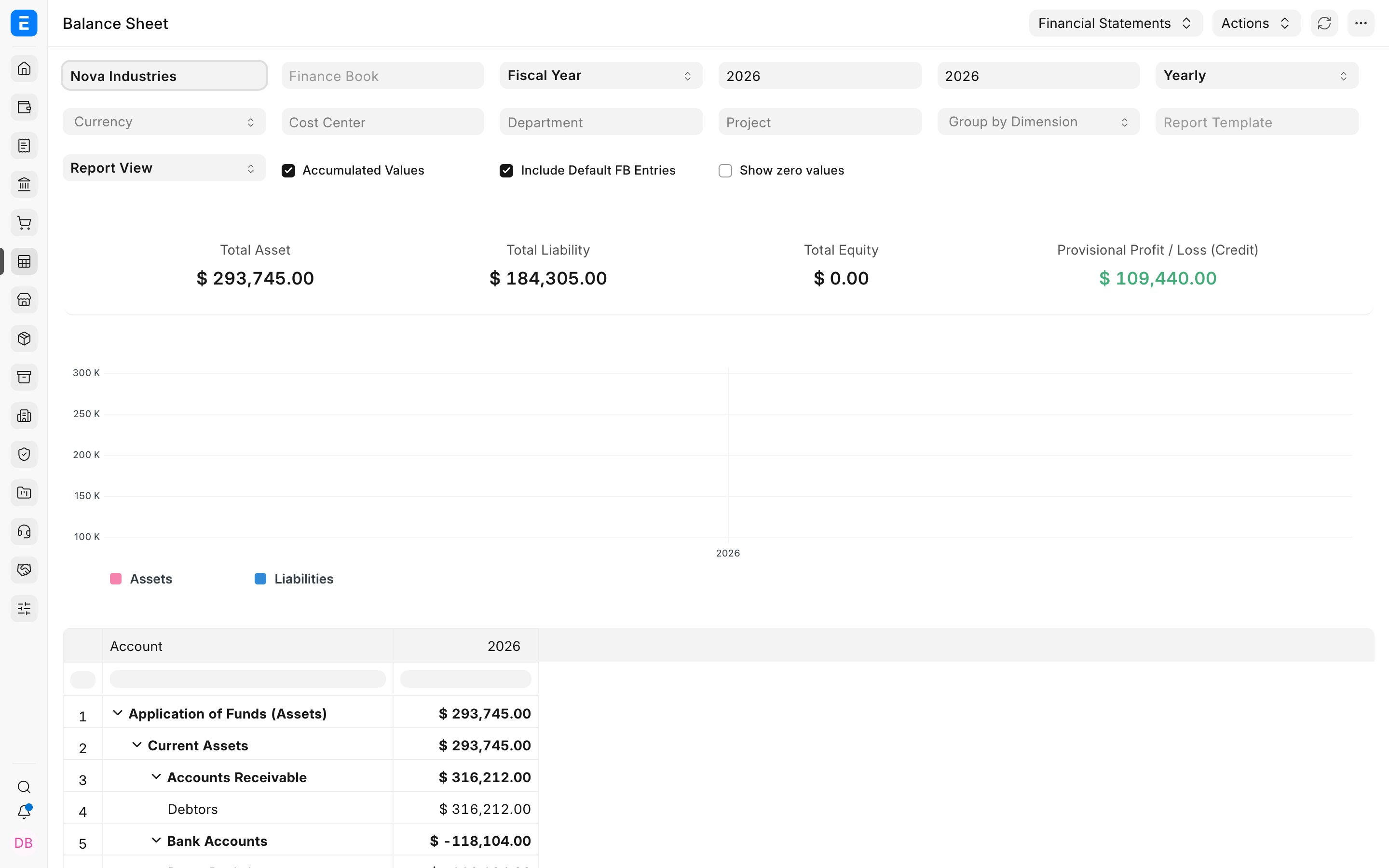
The summary above the table shows Total Asset, Total Liability, Total Equity, and Provisional Profit / Loss (Credit).
Provisional Profit / Loss (Credit) is the profit of the open period. It is not yet moved to equity, because that happens when you close the period with a Period Closing Voucher. If an earlier fiscal year is not closed, ERPNext adds an Unclosed Fiscal Years Profit / Loss (Credit) row and shows the message "Previous Financial Year is not closed".
Total assets equal total liabilities plus equity plus provisional profit. For example, Nova Industries shows assets of 293,745, liabilities of 184,305, no posted equity, and provisional profit of 109,440. Its receivables are 316,212 while its bank balance is negative, so the company is profitable on paper but short of cash. Accounts Receivable shows which customers to collect from.
A balanced statement proves the arithmetic only. It does not prove that each amount is in the right account.
Drill into a balance
Select an account amount to open the entries behind it:
- For most accounts, ERPNext opens the General Ledger with the same company, dates, cost center, project, and dimensions. Set the finance book and currency again before you compare totals.
- For a receivable or payable account, ERPNext opens Accounts Receivable or Accounts Payable for that account.
Filters and options
| Filter | Effect |
|---|---|
| Currency | Shows amounts in another presentation currency. Ledger entries do not change. |
| Report Template | Uses a Financial Report Template of type Balance Sheet for the layout. |
| Account Detail Level | With a template: Summary shows the template lines; Account Breakdown also lists the accounts under each line. |
| Select View | Report View shows amounts. Growth View shows the percentage change from the previous period. |
| Accumulated Values | Shows balances accumulated up to the end of each period. Selected by default. |
| Include Default FB Entries | Includes entries of the company's default finance book and entries without one. Selected by default. |
| Show zero values | Shows accounts with a zero balance. Not available with a template. |
Troubleshooting
The Balance Sheet does not balance
Check that the previous fiscal year is closed, that opening balances are complete, and that every account has the right root type. Then trace the difference with the Trial Balance and the General Ledger.
An account is in the wrong section
Check its Root Type and Report Type in the Chart of Accounts. Changing an account affects all reports that use it, so follow your accounting controls.
A segment balance sheet looks incomplete
A cost center, project, or dimension filter leaves out entries that do not carry that value. Check the dimension values on the source documents before you treat the result as a full balance sheet.