Plan raw materials for production
A Production Plan calculates the raw materials for its finished goods and sub-assemblies. It then creates Material Requests to buy them or to transfer them from other warehouses.
Prerequisites
- A draft Production Plan with its Assembly Items and, if needed, Sub Assembly Items.
Get the raw materials
- In the For Raw Materials section, select the For Warehouse. This is where the raw materials are needed. Stock Entries for production look for raw materials in this warehouse.
- Select the options that you need (see below).
- Select one button:
- Get Items for Purchase Only: fills in the Raw Materials table with the quantities to buy.
- Get Items for Purchase / Transfer: asks for the warehouses to transfer from. ERPNext suggests a transfer for the stock in those warehouses, and a purchase for the rest. If you select a group warehouse, ERPNext checks its child warehouses.
- Review the Raw Materials table. The Type of each row is the purpose of its Material Request, for example Purchase or Material Transfer.
After you submit the plan, select Create > Material Request.
Options for raw materials
| Option | What it does |
|---|---|
| Include Non Stock Items | Includes items that have Maintain Stock cleared. |
| Include Subcontracted Items | Adds the raw materials of subcontracted items when Include Exploded Items is cleared. |
| Consider Minimum Order Qty | Raises each quantity to the minimum order quantity of the item. |
| Include Safety Stock in Required Qty Calculation | Adds the safety stock of the item to the required quantity. |
| Consider Projected Qty in Calculation (RM) | Orders only the shortfall: Required Qty = Reqd Qty (BOM) − Projected Qty. |
| Raw Material Group Warehouse | A group warehouse whose child warehouses ERPNext checks for stock. Materials still arrive in For Warehouse. |
Example: order only the shortfall
To finish production you need 100 units of item A. You have 50 in stock and 20 on an open Purchase Order.
- With Consider Projected Qty in Calculation (RM) selected, the required quantity is 100 − (50 + 20) = 30.
- With it cleared, the required quantity is 100.
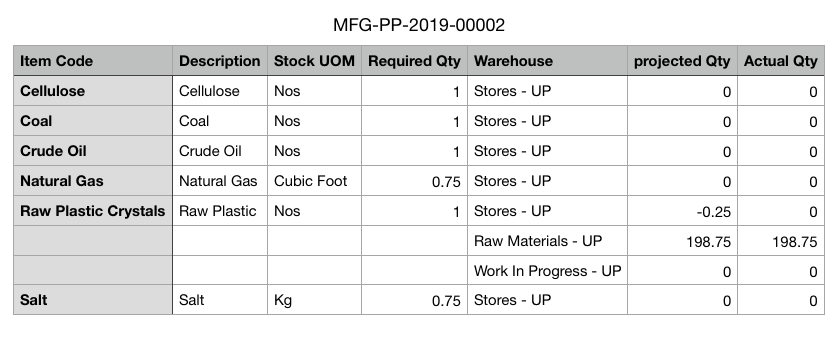
Download the material plan
- Select Download Required Materials.
- Select the warehouses in which to check the available stock.
ERPNext downloads a spreadsheet with the raw materials, the required quantities, and the stock in each selected warehouse.