About Bills of Materials
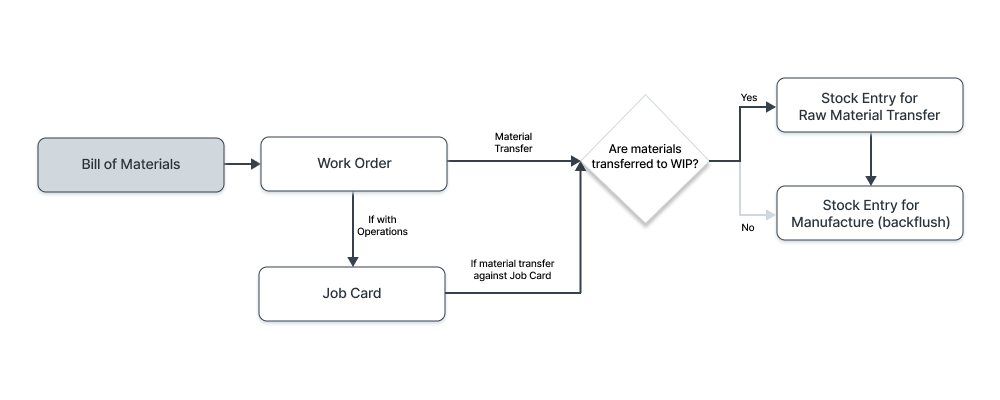
A Bill of Materials (BOM) is the recipe for one item. It lists the raw materials and sub-assemblies, their quantities, and optionally the operations that turn them into the item. ERPNext uses the BOM to create Work Orders and Job Cards, to plan purchases, and to estimate production cost.
What a BOM holds
- Item to Manufacture and Quantity (Output Qty): the item that the BOM makes, and how many units.
- Components: the raw materials and sub-assemblies, with the quantity of each.
- Operations: optional. The steps, workstations, and times. Shown when With Operations is selected.
- Secondary Items: optional. Scrap, co-products, and by-products that production also yields. Learn about secondary items.
- Costing: the estimated raw material cost, operating cost, and total cost.
Multi-level BOMs
A component can have its own BOM. That component is a sub-assembly. The BOMs then form a tree: the finished good at the top, sub-assemblies below it, and raw materials at the bottom.
The Exploded Items tab lists every raw material of the whole tree, including the raw materials of the sub-assemblies. The Components table lists only the direct components. Learn how to manage multi-level BOMs.
Default and active BOMs
An item can have several BOMs, for example one for each set of materials. Two checkboxes control which BOM ERPNext uses:
- Is Active: only active BOMs can be selected in documents.
- Is Default: Work Orders and Production Plans use the default BOM of the item unless you select another one.
Why a submitted BOM does not change
After you submit a BOM, you cannot edit it. Work Orders, Job Cards, and parent BOMs link to it, and their quantities and costs depend on it. To change a BOM, cancel it and amend it, or copy it and submit the copy. Then use the BOM Update Tool to replace the old BOM in parent BOMs.
Plan the components carefully before you submit. Correct BOMs give correct material requests and correct costs.
How ERPNext costs a BOM
The raw material cost comes from the rate of each component. Rate Of Materials Based On sets where that rate comes from: Valuation Rate, Last Purchase Rate, or Price List. The operating cost comes from the hourly rate of each workstation and the operation time. Learn how to set BOM costing.