Record stock value with periodic inventory
With periodic inventory, ERPNext does not post accounting entries when stock comes in or goes out. You book purchases as expenses. At the end of each period, you bring the stock accounts in line with the value of stock in hand.
The difference between the current stock value and the stock account balance can be positive or negative:
- If the stock value is higher, the difference moves from expenses (cost of goods sold) to the stock asset account.
- If the stock value is lower, the entry goes the other way.
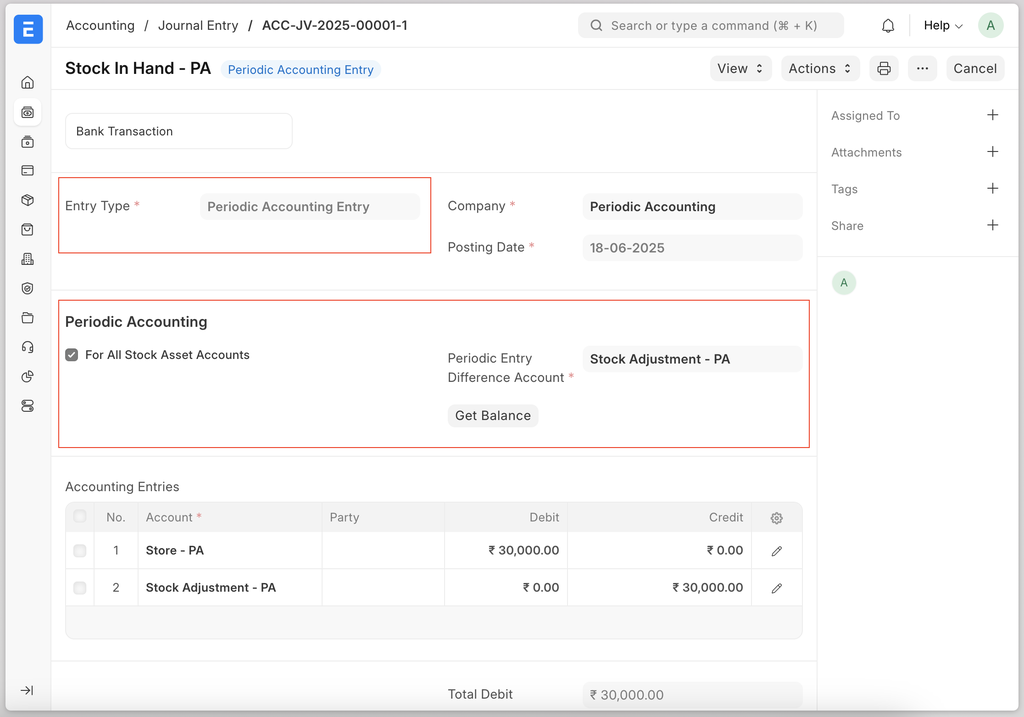
ERPNext calculates this difference for you with a Journal Entry of the type Periodic Accounting Entry.
Prerequisites
- In the Company, Enable Perpetual Inventory is cleared. ERPNext stops a Periodic Accounting Entry for a company that uses perpetual inventory.
- Each warehouse is linked to a stock account, directly, through a parent warehouse, or through the Default Inventory Account of the Company. See Set inventory accounts for warehouses and items.
Create a Periodic Accounting Entry
- Open the Journal Entry list and create a new Journal Entry.
- In Entry Type, select Periodic Accounting Entry.
- Set the Company and the Posting Date. The posting date is the end of the period.
- In Periodic Entry Difference Account, select the account that takes the other side of the entry, usually your cost of goods sold or purchase expense account.
- Select Get Balance. For each stock account, ERPNext compares the stock value on the posting date with the account balance. It adds one row for the stock account and one row for the difference account. Accounts with no difference are skipped.
- Check the rows, then submit the Journal Entry.