Project reports
The project reports show progress, time, billing, material, and delays. To open a report, search for its name in the search bar.
Project Summary
Shows each project with its status, start and end dates, and the number of linked tasks and timesheets. Use it to see the state of all projects at a glance.
Daily Timesheet Summary
Lists the timesheet rows of a period, with the activity, the hours, the task, and the project. Use it to review how people spent their time each day.
Timesheet Billing Summary
Shows the working hours, billable hours, billing rates, and billing amounts of timesheets in a period. Use it to review time-and-material billing.
Project Wise Stock Tracking
Shows the Items purchased and issued for each project, with the project status, the project value, and the start and completion dates. Use it to follow material use against each project.
Delayed Tasks Summary
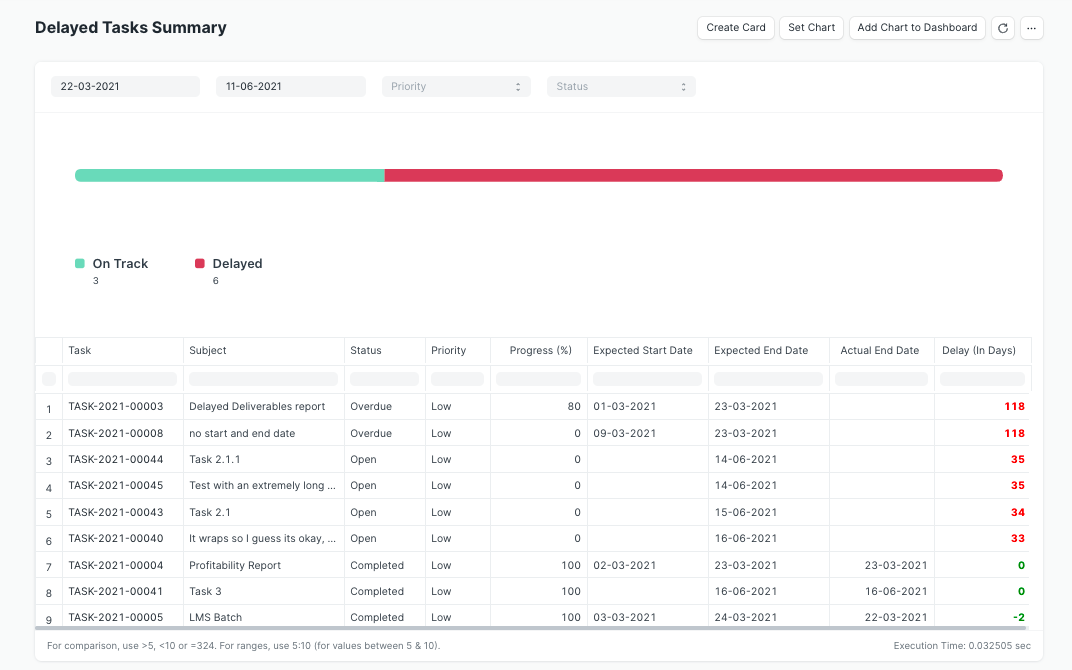
Lists tasks with their progress and their expected start and end dates, and shows which are on track and which are delayed. The chart counts the On Track and the Delayed tasks for your filters.
ERPNext calculates the delay of each task as follows:
| Task | Delay |
|---|---|
| Completed, with Completed On set | Completed On − Expected End Date |
| Not completed, or Completed On not set | Today − Expected End Date |
Completed On shows on the task when its status is Completed.