Troubleshoot permission errors
Start every check with the user's roles and user permissions. Test as a user with the same roles, not as Administrator.
A report says the user has no permission on a linked document
Example: a user with the Accounts User and Accounts Manager roles opens the Accounts Receivable report. ERPNext says that the user has no permission on Territory.
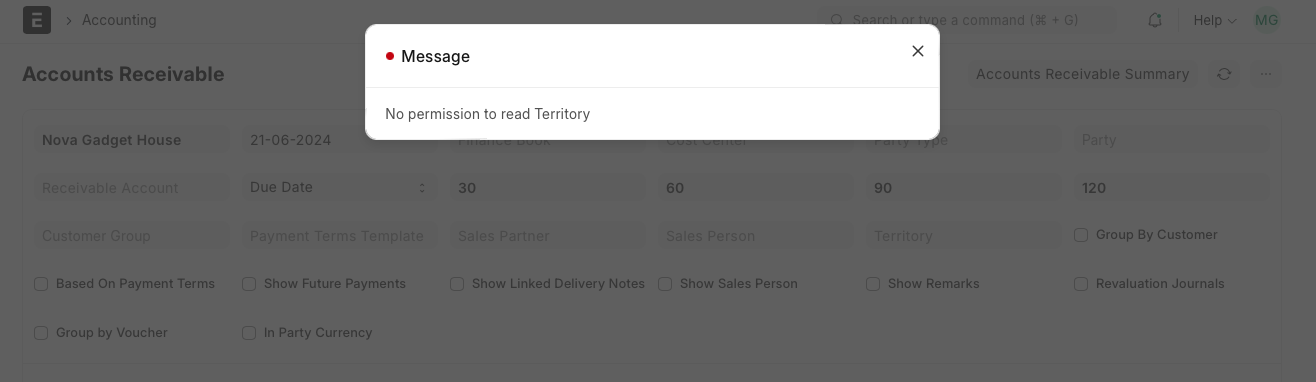
Cause: to open a form or a report, a user needs at least Read on every document that it links to. Territory is a link in the Accounts Receivable report, and neither role can read Territory.
Fix:
- Open the Role Permissions Manager and select the document named in the error, here Territory.
- Add a rule for one of the user's roles, here Accounts User, at level 0.
- Select Read.
The user can then open the report.
Error: Permission at level 0 must be set before higher levels are set
Example: when you add a rule in the Role Permissions Manager, ERPNext shows:
For System Manager at level 2 in Customer in row 8: Permission at level 0 must be set before higher levels are set.
Cause: a role named in the message has rules at level 1 or higher for that document, but no rule at level 0.
Fix: do one of these for that role and document, then add your rule again:
- Add a rule at level 0.
- Remove the rules at the higher levels.
A user can still open a module that should be hidden
Cause: hiding a module or a workspace changes the desk, not the permissions.
Fix: remove the role, or the role permission on the documents. See Limit the modules a user sees.
A user sees documents of another company or territory
Cause: the role gives access to all documents of that kind.
Fix: add user permissions for the user's company or territory. Check that the document was not shared with the user.
A user cannot see a document that their role allows
Causes and fixes:
- A user permission limits the user to other records. Check the Permitted Documents For User report.
- The field that links the record is empty and Apply Strict User Permissions is on in System Settings.
- The fields are at a permission level that the role has no rule for.