Back up to Amazon S3
S3 Backup Settings uploads the database backup and the files of your site to an S3 bucket on a schedule. It works with Amazon S3 and with S3-compatible storage.
INFO
Offsite backups (S3, Dropbox, and Google Drive) moved out of the Frappe Framework into the offsite_backups app in version 16. Install the app to see S3 Backup Settings.
TIP
On Frappe Cloud, onsite and offsite backups are created for you. See Frappe Cloud backups.
Prerequisites
- The System Manager role.
- An outgoing Email Account, so that ERPNext can send backup alerts.
- An AWS account, or an account with an S3-compatible provider.
Create an S3 bucket and an access key in AWS
Create a new S3 bucket. Keep Block all public access on. Turn on encryption, versioning, or object lock if you need them.
In IAM (Identity and Access Management), create a policy for the S3 service that allows only
s3:ListBucketands3:PutObjecton your bucket. In the JSON editor, the policy looks like this:json{ "Version": "2012-10-17", "Statement": [ { "Effect": "Allow", "Action": ["s3:PutObject", "s3:ListBucket"], "Resource": ["arn:aws:s3:::YOUR-BUCKET/*", "arn:aws:s3:::YOUR-BUCKET"], "Condition": { "IpAddress": { "aws:SourceIp": "YOUR-SERVER-IP" } } } ] }Create a new IAM user for programmatic access, and attach the policy to it.
Copy the access key ID and the secret access key of the user.
To delete old backups or move them to cheaper storage, use S3 lifecycle rules.
Create a bucket with S3-compatible storage (Hetzner example)
This example uses the MinIO client (mc) and the Hetzner region nbg1. Replace the capitalized values with your own.
In the Hetzner console, create S3 credentials (a key and a secret).
Connect the client to Hetzner:
bashmc alias set MY_ALIAS https://nbg1.your-objectstorage.com YOUR_S3_KEY YOUR_S3_SECRETCreate a bucket with object locking, so that nobody can delete a backup by mistake:
bashmc mb MY_ALIAS/BUCKET_NAME --with-lock --region nbg1 mc retention set GOVERNANCE 90d --default MY_ALIAS/BUCKET_NAME mc retention info --json --default MY_ALIAS/BUCKET_NAMEIn S3 Backup Settings, set Endpoint URL to
https://nbg1.your-objectstorage.com/.
Set up S3 Backup Settings
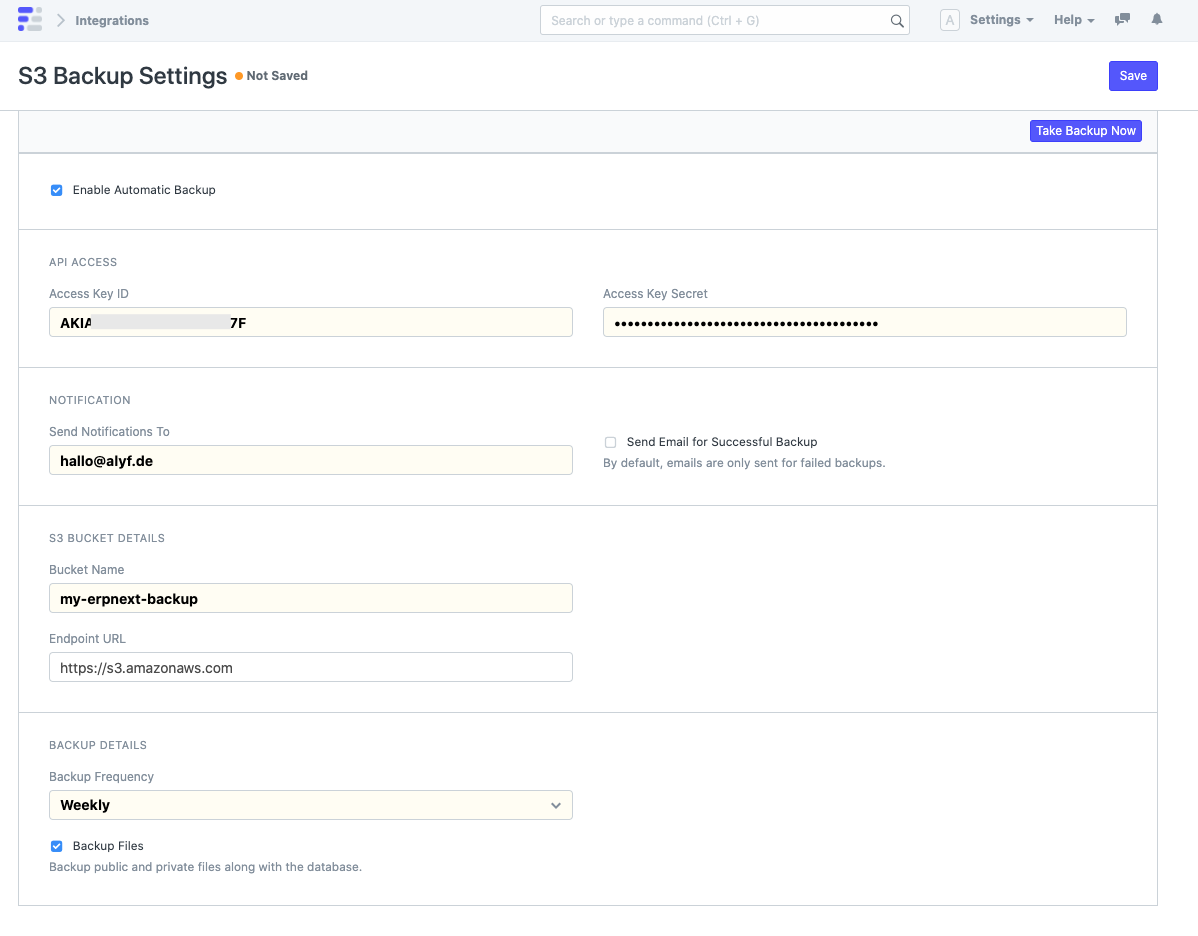
- Open S3 Backup Settings.
- Select Enable Automatic Backup.
- Enter the Access Key ID and the Access Key Secret.
- Enter the Bucket Name. For a provider other than AWS, also enter the Endpoint URL.
- Enter the email address that gets an alert when a backup fails. To get an email for each successful backup too, select Send Email for Successful Backup.
- Select the backup frequency, from daily to monthly. Select None to take backups only by hand.
- Save.
Restore a file from a versioned bucket
List all versions, then download the version that you need:
mc ls -r --versions MY_ALIAS/BUCKET_NAME/
mc get --vid VERSION_ID MY_ALIAS/BUCKET_NAME/20260415_162402/20260415_162402-site-database.sql.gz ~/Downloads